Generate an access token for the Identity Governance API
To access the Identity Governance REST API endpoints, you generate an OAuth 2.0 access token using the client-credentials grant type. This token authenticates your application and grants it permission to make API calls to Identity Governance.
|
The standard Advanced Identity Cloud service-account method for obtaining an access token doesn’t work with Advanced Identity Cloud Identity Governance. Instead, you must use a token-modification script to generate an access token that includes the necessary claims for Identity Governance. |
This guide walks you through the process. You learn how to create a custom application with client credentials, add a token-modification script, and configure OAuth 2.0 provider overrides. These steps ensure you can generate an access token for Identity Governance.
Task 1: Create a custom application for client credentials
-
In the Advanced Identity Cloud admin console, go to Applications > Custom Application.
-
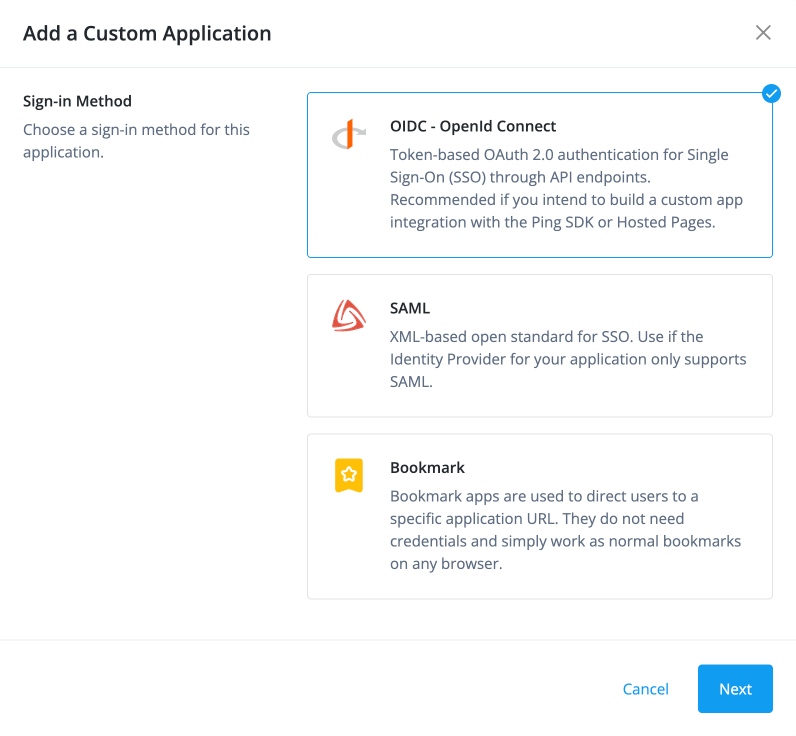
In the Add a Custom Application modal, click OIDC - OpenId Connect, and click Next.
-
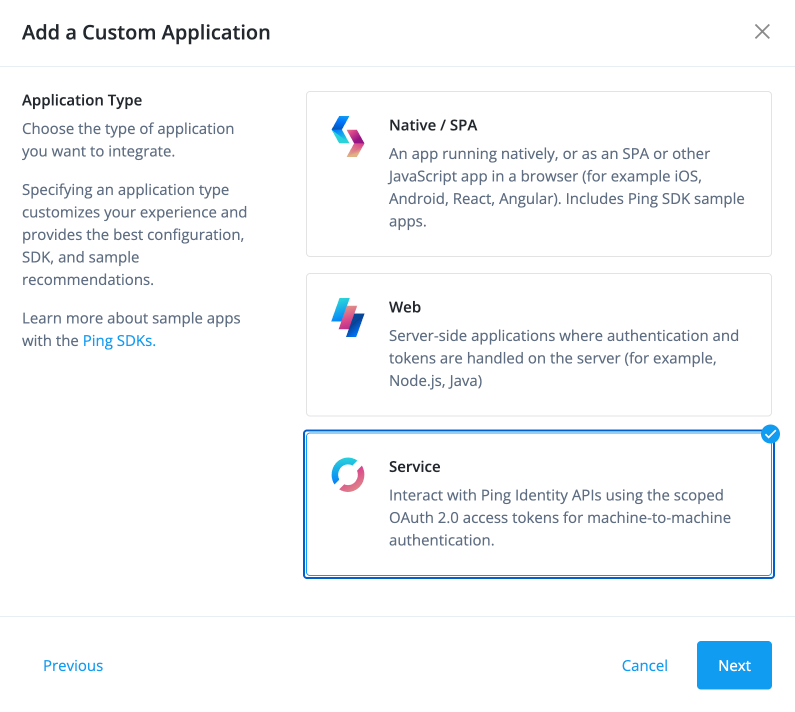
Next, for application type, select Service, and click Next.
-
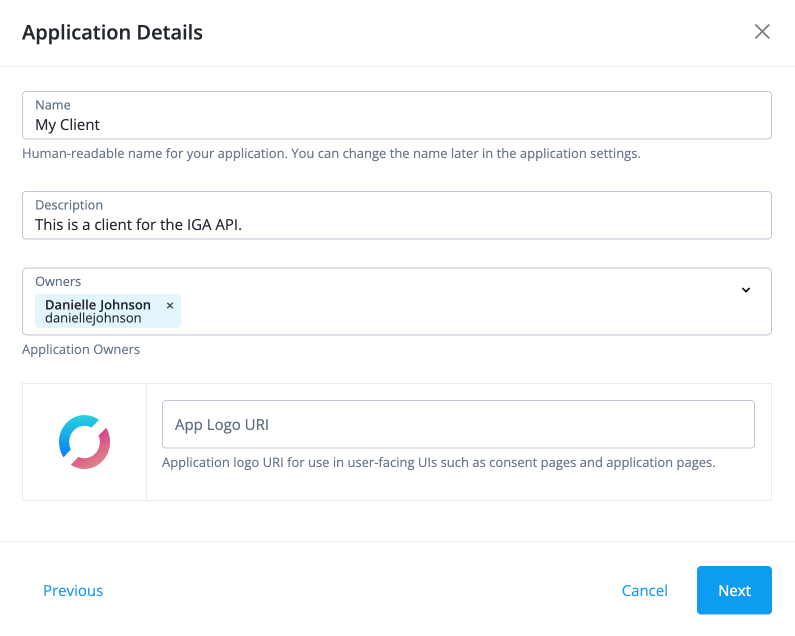
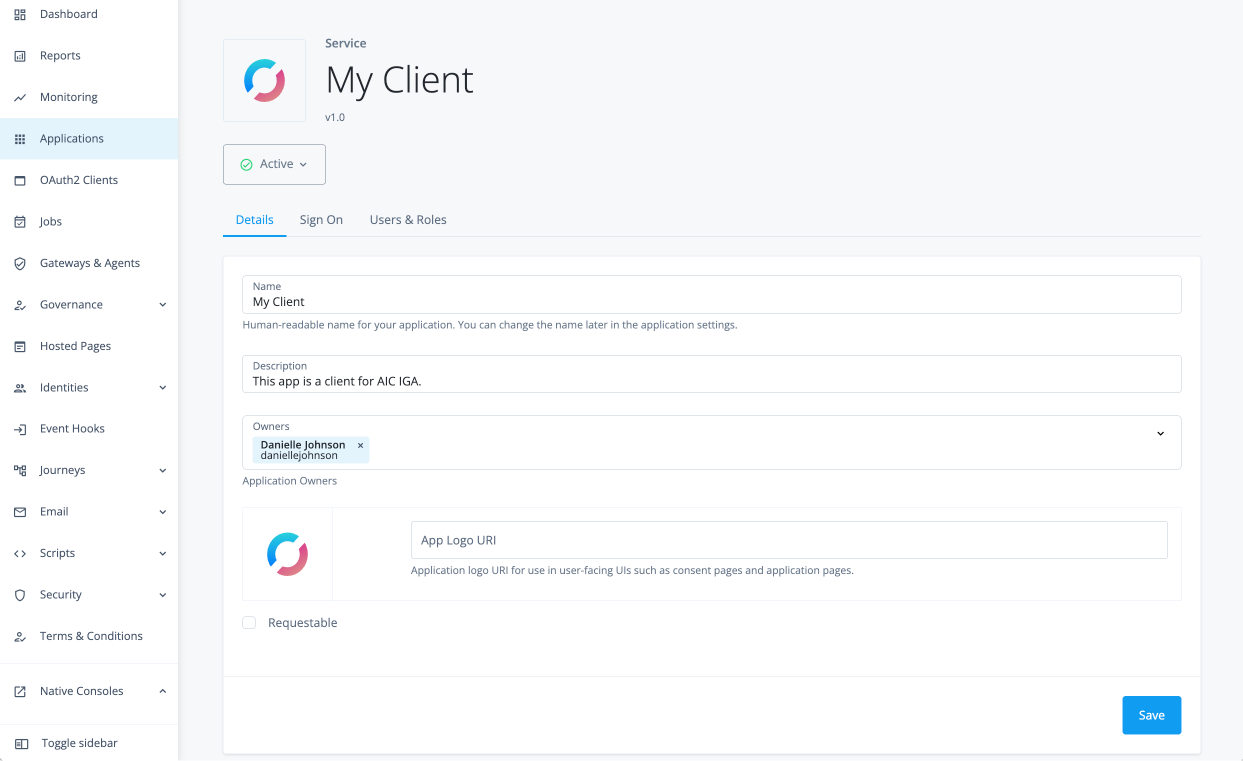
In the Application Details modal, enter the following, and click Next.
-
Name: A name for your application, such as "My Client".
-
Description: A description for your application, such as "Client application for accessing the IGA API".
-
Owners: The owner of the application. You can add multiple owners if needed.
-
App Logo URI: (Optional) A URI for the application’s logo.
-
-
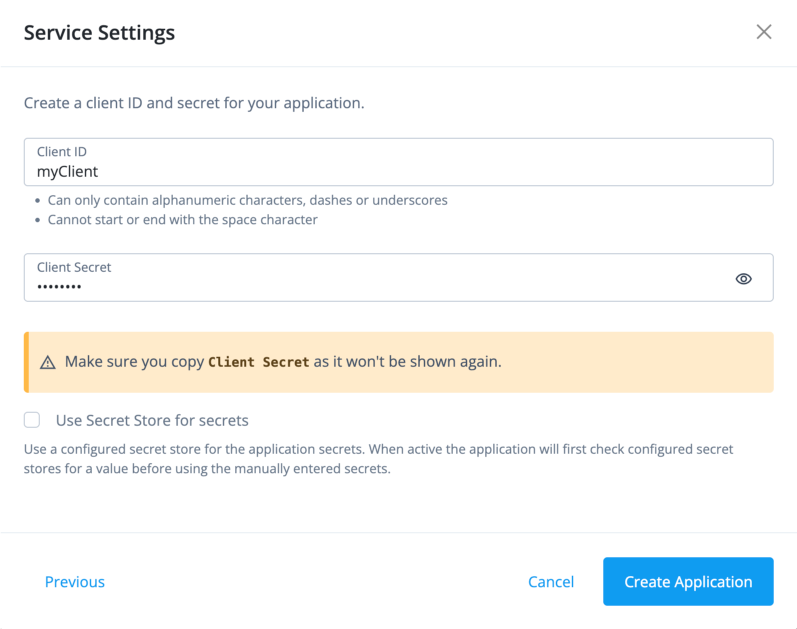
In the Service Settings modal, enter the following, and click Create Application.
-
Client ID: A unique identifier for your client application, such as "my-client".
-
Client Secret: A secret string used for authentication. Make sure to store this securely, as it won’t be shown again.
-
-
On your custom application page, click the Sign On tab.
-
In the Scopes field, add the following, and click Save to save the application.
-
fr:idm:* -
fr:iga:* -
dynamic_client_registration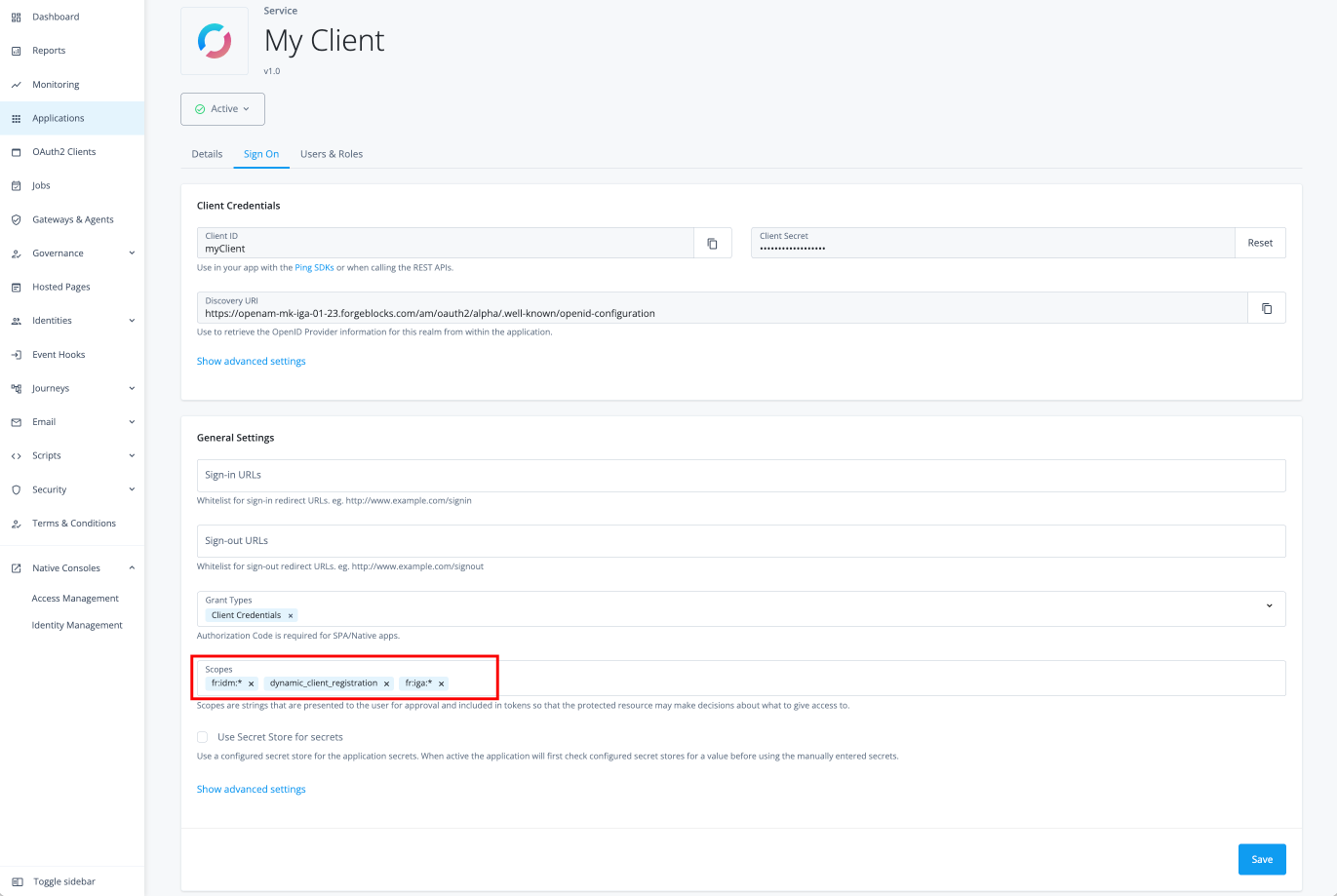
-
Task 2: Add token modification script
Token modification scripts let you customize access tokens as they are issued. You can use them to add claims, adjust token lifespans, or incorporate custom attributes to meet your application’s authorization needs.
The following instructions show you how to create a script for client-credential-based authentication in Identity Governance. For more general information on developing and deploying these scripts, learn more in token modification scripts.
-
In the Advanced Identity Cloud admin console, go to Native Consoles > Access Management.
-
Click Scripts, and click New Script.
-
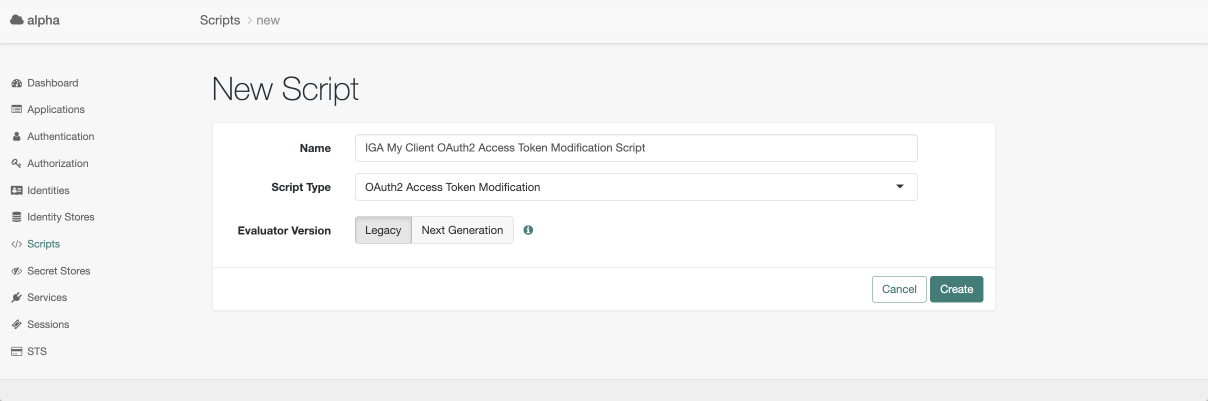
On the New Script page, enter the following, and then click Create.
-
Name: A name for your script, such as
IGA My Client OAuth2 Access Token Modification Script. -
Script Types: Select OAuth2 Token Modification.
-
-
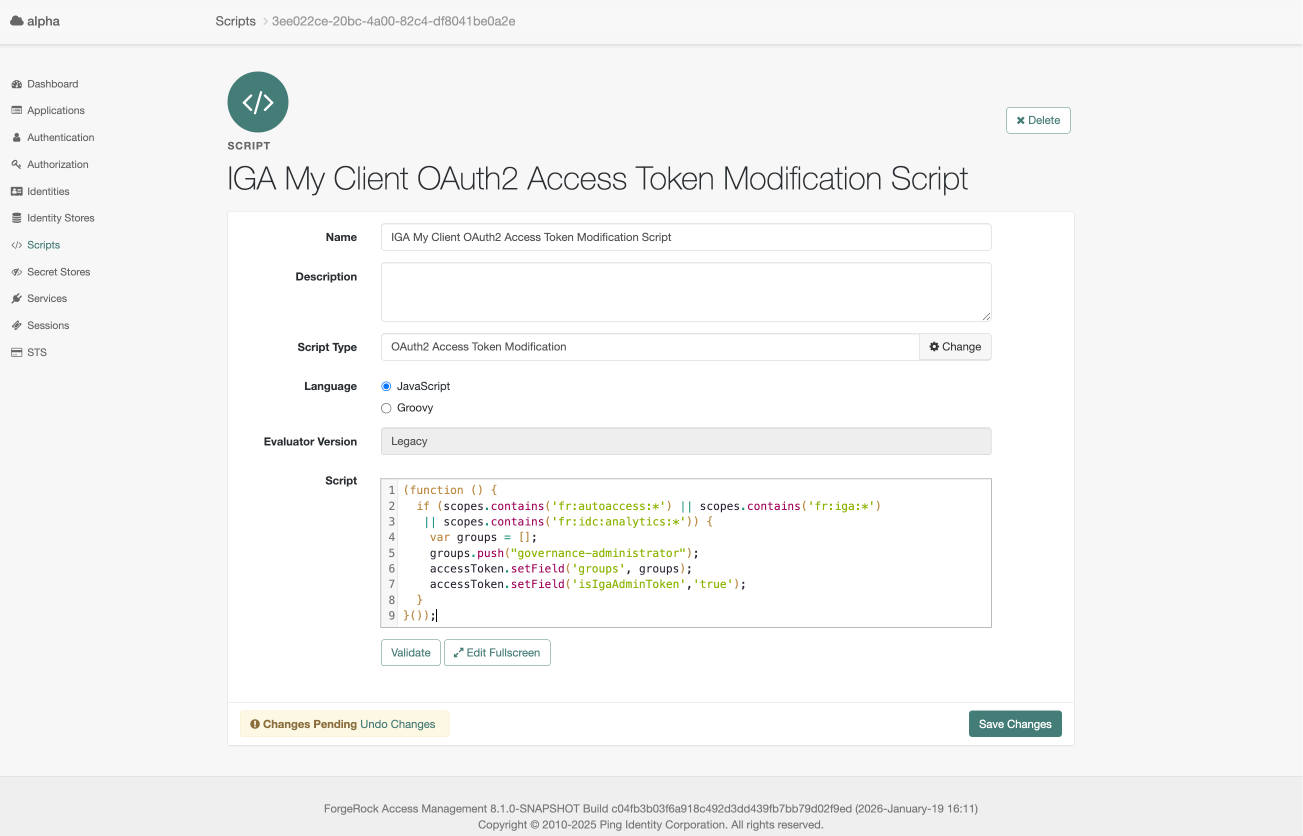
On the script page, add the following JavaScript code to the script editor, and then click Save Changes to save the script.
(function () {
  if (scopes.contains('fr:autoaccess:*') || scopes.contains('fr:iga:*')
   || scopes.contains('fr:idc:analytics:*')) {
    var groups = [];
    groups.push("governance-administrator");
    accessToken.setField('groups', groups);
    accessToken.setField('isIgaAdminToken','true');
  }
}());
Task 3: Add OAuth 2.0 provider overrides
When you configure OAuth 2.0 access tokens in Advanced Identity Cloud, you can override the claims they contain. A claim is a statement of information about a subject, such as an end-user or a client application.
This feature gives you granular control over the token’s content. You can inject essential authorization data or add custom attributes to tailor an access token to your application’s unique requirements.
For general information on claims, learn more in Overriding claims.
-
In the AM admin UI, go to Applications > OAuth 2.0 > Clients.
-
Select your client application. Confirm that the client name matches the application name.
-
On the Core tab, enter default scopes for your client application, and click Save Changes:
-
Default Scope(s): Add
fr:idm:*andfr:iga:*to ensure that the access token includes the necessary scopes for accessing the Identity Governance REST API.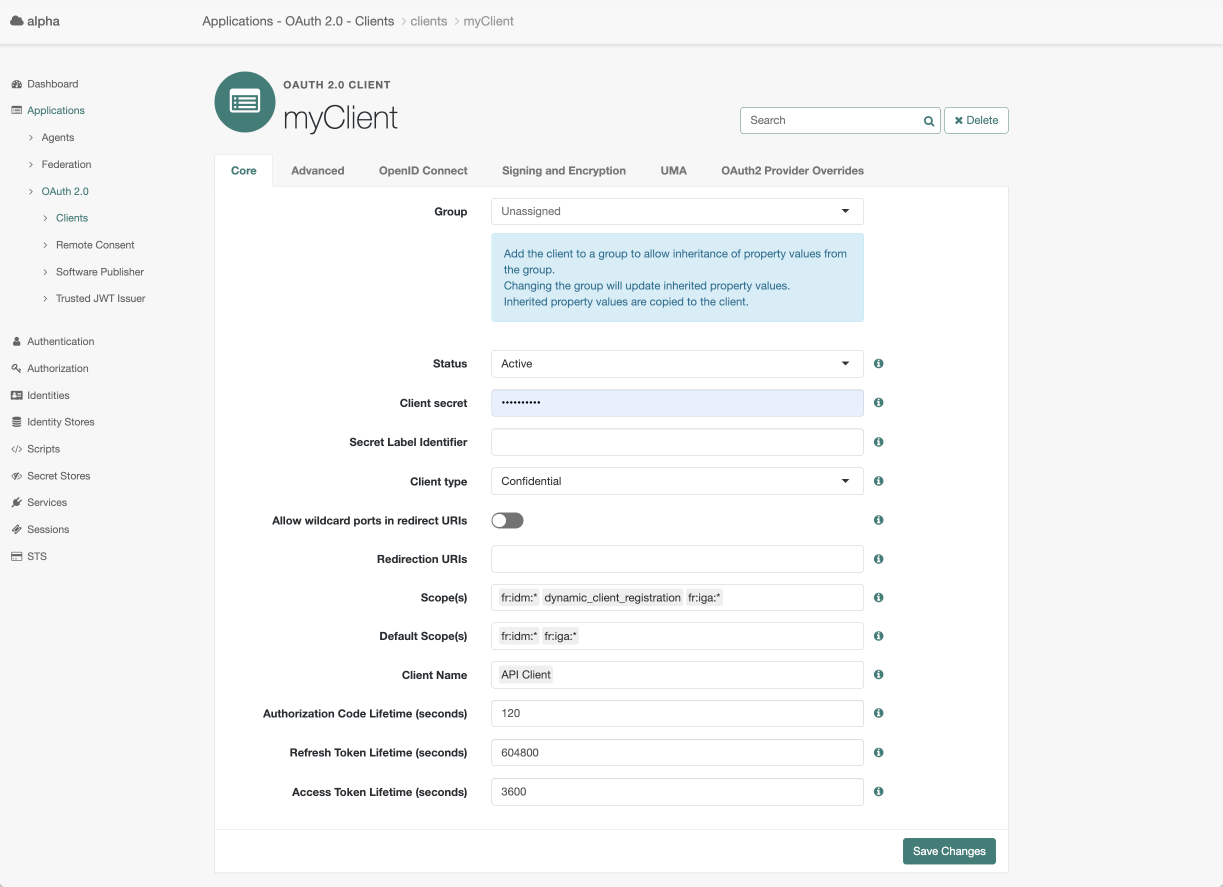
-
-
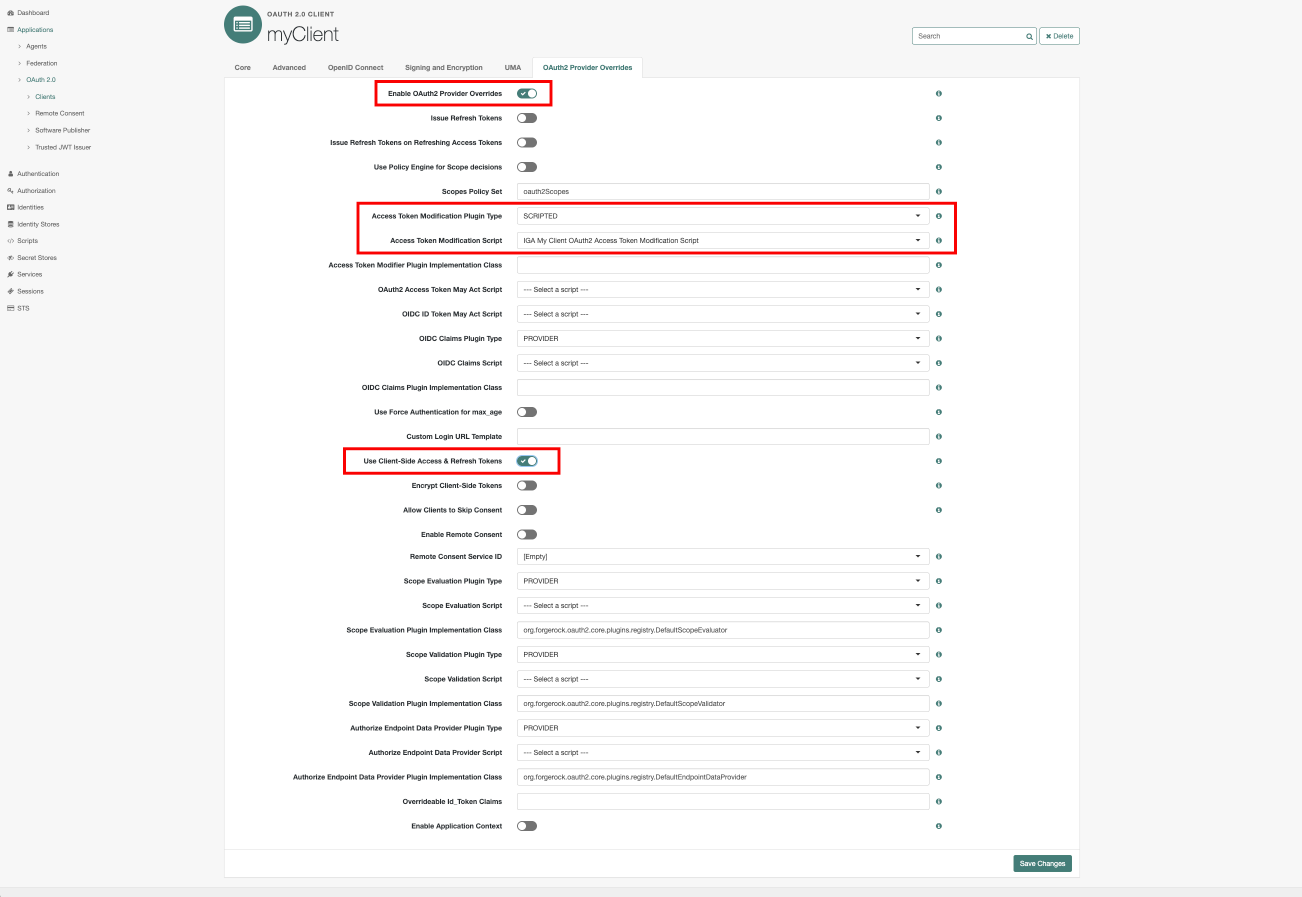
On your client application page, click the OAuth 2.0 Provider Overrides tab. Select the following, and click Save Changes to save the overrides:
-
Enable OAuth 2.0 Provider Overrides: Click to enable.
-
Access Token Modification Plugin Type: Select SCRIPTED.
-
Access Token Modification Script: Select the token modification script you created in the previous task, such as
IGA My Client OAuth2 Access Token Modification Script. -
Use Client-Side Access & Refresh Tokens: Click to enable.
-
Task 4: Get an access token
Follow the instructions to get an access token.
-
Use cURL or a similar HTTP client to make a POST request to the token endpoint. The request must include the client credentials and specify the
client_credentialsgrant type.In your access token request, make sure to include the following scopes:
fr:idm:* fr:iga:*.curl --request POST \ --user '<client-id>:<client-secret>' \ --header 'Content-Type: application/x-www-form-urlencoded' \ --data 'grant_type=client_credentials' \ --data 'scope=fr:idm:* fr:iga:*' \ 'https://<tenant-env-fqdn>/am/oauth2/realms/root/realms/alpha/access_token'The example response is:
The
access_tokenvalue is truncated for readability. The actual access token is a long string.{ "access_token": "eyJ0e…FQyK8", "scope": "fr:idm:* fr:iga:*", "token_type": "Bearer", "expires_in": 3594 }
Task 5: Use the access token to access an Identity Governance endpoint
To use the access token with the REST API, set it as a bearer token in the Authorization HTTP header for each API request.
The following example uses the access token to get a list of applications:
Show request
$ curl \
--request GET 'https://<tenant-env-fqdn>/iga/governance/application?_pageSize=10&_queryFilter=true' \(1)
--header 'Authorization: Bearer <access-token>'(2)| 1 | Replace <tenant-env-fqdn> with the fully qualified domain name of your tenant. |
| 2 | Replace <access-token> with the access_token in the authentication response (learn more in Task 4: Get an access token). |
Show response
{
  "result": [
    {
      "application": {
        "_rev": "ea896341-28d2-48d3-a01a-430c78acc019-123140",
        "authoritative": false,
        "connectorId": "SNOW",
        "description": "Sanjay's SNOW",
        "fr": {
          "realm": "alpha"
        },
        "icon": "",
        "id": "e35d09cd-2b9b-41bc-8246-dc23d4a36502",
        "mappingNames": [
          "systemSnowUser_managedAlpha_user",
          "systemSnowRole_managedAlpha_assignment",
          "systemSnowGroup_managedAlpha_assignment",
          "managedAlpha_user_systemSnowUser",
          "systemSnowDepartment_managedAlpha_assignment",
          "systemSnowLocation_managedAlpha_assignment",
          "systemSnowCompany_managedAlpha_assignment",
          "systemSnowCostcenter_managedAlpha_assignment"
        ],
        "metadata": {
          "entityType": "/openidm/managed/application",
          "created": "2025-03-25T05:23:13.825Z"
        },
        "name": "SNOW",
        "objectTypes": [
          {
            "name": "Role",
            "accountAttribute": "__user_role_ids__"
          },
          {
            "name": "Group",
            "accountAttribute": "__user_group_ids__"
          },
          {
            "name": "Department",
            "accountAttribute": "department"
          },
          {
            "name": "Company",
            "accountAttribute": "company"
          },
          {
            "name": "User"
          },
          {
            "name": "CostCenter",
            "accountAttribute": "costCenter"
          },
          {
            "name": "Location",
            "accountAttribute": "location"
          }
        ],
        "templateName": "servicenow",
        "templateVersion": "3.3"
      },
      "applicationOwner": [
        {
          "id": "75982e79-40dc-4ad2-8b85-abe1ebd2e2b9",
          "userName": "fyork",
          "givenName": "Frank",
          "sn": "York",
          "mail": "fyork@example.com"
        }
      ],
      "glossary": {
        "idx": {
          "/application": {
            "num": 0
          }
        },
        "types": [
          {
            "attrKey": "/application",
            "modified": "2025-03-18T20:12:01.161921627Z",
            "type": "entityType/id/realm"
          }
        ]
      },
      "id": "e35d09cd-2b9b-41bc-8246-dc23d4a36502",
      "item": {
        "type": "accountGrant"
      },
      "latestModified": {
        "application": "2025-03-25T05:23:13.825Z",
        "applicationOwner": {
          "75982e79-40dc-4ad2-8b85-abe1ebd2e2b9": "2025-04-30T14:43:16.44Z"
        },
        "glossaries": {
          "/application": {
            "entityType/id/realm": "2025-03-18T20:12:01.161921627Z"
          }
        }
      },
      "scopes": {
        "view": [
          {
            "id": "ff7f878c-ea21-4ea1-adf9-e91688301408",
            "timestamp": "2025-03-21T15:11:03.146Z"
          },
          {
            "id": "9d9b6f44-7cd5-40a0-83ed-19c4ff16ffe1",
            "timestamp": "2025-05-06T03:02:21.387Z"
          },
          {
            "id": "62866922-48f8-4a1a-bcf8-07e3168efbe7",
            "timestamp": "2025-05-08T18:02:03.64Z"
          }
        ],
        "createEntitlement": [
          {
            "id": "ff7f878c-ea21-4ea1-adf9-e91688301408",
            "timestamp": "2025-03-21T15:11:03.146Z"
          },
          {
            "id": "9d9b6f44-7cd5-40a0-83ed-19c4ff16ffe1",
            "timestamp": "2025-05-06T03:02:21.387Z"
          },
          {
            "id": "62866922-48f8-4a1a-bcf8-07e3168efbe7",
            "timestamp": "2025-05-08T18:02:03.64Z"
          }
        ]
      },
      "metadata": {
        "modifiedDate": "2025-05-08T18:42:14.146Z",
        "createdDate": "2025-03-18T20:15:18.276732519Z"
      },
      "permissions": {
        "createEntitlement": true
      }
    },
    ...
    {
      "application": {
        "_rev": "ea896341-28d2-48d3-a01a-430c78acc019-240426",
        "fr": {
          "realm": "alpha"
        },
        "id": "ade13837-93de-4993-9c86-20254c76dbe3",
        "metadata": {
          "entityType": "/openidm/managed/application",
          "created": "2025-03-26T06:19:22.012Z"
        },
        "name": "my_application_5397010386186912",
        "ssoEntities": {
          "oidcId": "my_application_5397010386186912"
        },
        "templateName": "native-override",
        "templateVersion": "1.0"
      },
      "applicationOwner": [
        {
          "id": "ca204525-7c4e-4433-8ac1-14eafaf7ba78",
          "userName": "e2eTestUser4147855424107766",
          "givenName": "e2eTestUser4147855424107766",
          "sn": "test",
          "mail": "forgerockdemo@example.com"
        }
      ],
      "id": "ade13837-93de-4993-9c86-20254c76dbe3",
      "item": {
        "type": "accountGrant"
      },
      "latestModified": {
        "application": "2025-03-26T06:19:22.012Z",
        "applicationOwner": {
          "ca204525-7c4e-4433-8ac1-14eafaf7ba78": "2025-03-26T06:19:15.176Z"
        }
      },
      "scopes": {
        "view": [
          {
            "id": "ff7f878c-ea21-4ea1-adf9-e91688301408",
            "timestamp": "2025-03-21T15:11:03.146Z"
          },
          {
            "id": "62866922-48f8-4a1a-bcf8-07e3168efbe7",
            "timestamp": "2025-05-08T18:02:03.64Z"
          }
        ],
        "createEntitlement": [
          {
            "id": "ff7f878c-ea21-4ea1-adf9-e91688301408",
            "timestamp": "2025-03-21T15:11:03.146Z"
          },
          {
            "id": "62866922-48f8-4a1a-bcf8-07e3168efbe7",
            "timestamp": "2025-05-08T18:02:03.64Z"
          }
        ]
      },
      "metadata": {
        "modifiedDate": "2025-05-08T18:42:15.27Z",
        "createdDate": "2025-03-26T06:25:55.833413183Z"
      },
      "permissions": {
        "createEntitlement": true
      }
    }
  ],
  "searchAfterKey": [
    "30bb18e30bad14e27f73c90390b0f16df0d0208a5ecfb5f38fca8ac44f350a802a9ded2ee244acca76325e222df57a058bb646ecccf402ac0899304b2a0b684a"
  ],
  "totalCount": 83,
  "resultCount": 10
}