Hardening the handoff: a pattern for app-to-web single sign-on
A walkthrough of a standards-based pattern for securely transferring an OAuth session from a native mobile app to a web browser using Pushed Authorization Requests (PAR).

This post was originally published on Medium.
We’ve all been there, haven’t we? That shiny mobile app that you’ve just downloaded from your favourite brand, the one that’s offered you a really clean and modern sign in experience (without browser hand-offs, perhaps even using a passkey for quick login), suddenly and inexplicably spits you out into a browser view when you tap a particular button or menu item. Hybrid apps — those that combine both native and web elements — are an unavoidable reality for many organisations (and their users) as they look to balance time to market on new features with ever-stretched engineering budgets and the technical debt further down the stack that they’ve never quite managed to pay off.
As identity professionals who care about that delicate balance between user experience and security, the question that comes up time and again is this: what is the best way to secure these apps? How do I ensure a slick user authentication process at the start and then safely re-use that session across all aspects of my application, when some parts of it are delivered via browser or web-view? In this article, I’ll explore the challenges that these hybrid app models present to us and propose a workable solution based on modern identity standards (with a sprinkling of identity orchestration). The solution I describe below has been built and tested using Ping Identity’s PingOne SSO identity provider together with the PingOne DaVinci identity orchestration engine.
Eager for the punchline? Here’s the succinct summary for those on a time and attention budget!
The session transfer problem
Before we can start to solve the challenges that we face in securing hybrid mobile applications, we should start by better defining the problem space. For the purposes of this discussion, we define a hybrid mobile application as a native application running on a mobile device where certain portions of the application’s functionality are delivered via a web browser or web view on the device — that is to say, the app is not fully native. The exact specifics of how and when the app switches context between a native delivery versus a browser-based delivery of functionality are not important, however there are two requirements that we must fulfil, namely
- access to the browser-based content requires an authenticated user session (presumably in the form of a browser session cookie, which is how these things have always been done)
- the user has already performed authentication in order to access the app itself and as such should not be prompted to re-authenticate in order to access the browser-based content.
A number of follow-on points are salient here and those who have grappled with this situation in the past are no doubt familiar with them. The most important ones are, perhaps, as follows:
- In a native application context, the authenticated user session is typically represented by an OAuth access token, issued to the application by a trusted Authorisation Server in response to a user login.
- There are established best practices for how a native application should go about obtaining such a token by leveraging the Auth Code Flow with PKCE via the system browser. This approach is battle-hardened and peer-reviewed and should always be the first alternative considered when building a user authentication process for a native app.
- To directly contradict the previous point, however, many (if not most) digital product owners and UX designers find the experience trade-off unacceptable and thus strongly resist using a browser-delivered authentication ceremony within the context of a native application, preferring to use fully native SDKs to interact directly with the authentication service to obtain the necessary access token.
- Whichever approach is selected for initial user authentication, the basic requirement is the same in terms of providing a single-sign-on experience if the app includes hybrid web content; in order for the user to access said content without re-authentication, there needs to be a session cookie present in the browser at the time that content is requested. This is the most basic requirement (the sine qua non, if you will) without which the user is guaranteed to be prompted for repeat authentication
All this talk of cookies is possibly making you hungry by now, but we do need to explore the intricacies just a little deeper before taking a well-earned coffee break! This problem really is all about cookies, though — that much we cannot deny. One would think and would hope that the pattern of using the system browser to obtain authentication credentials from the user in the first place would create a session cookie in that browser as a serendipitous side effect (and give us a further piece of ammunition in convincing our product owner and UX colleagues to eschew a fully-native alternative). In practice, however, this approach has been shown to be non-deterministic at best, if not downright flaky, due to the somewhat arcane and seemingly ever-changing rules regarding cookie persistence and visibility across browser tabs and invocations. Without going into all of the details, I think it is sufficient to say that, based on the experiences of many doing this work in the field today, we cannot assume that a session cookie set during initial login will be available during subsequent browser-based interactions. The reasons for this are all very well-meant; examples being Apple’s Intelligent Tracking Prevention feature and Google’s equivalent Privacy Sandbox work — designed to increase user privacy. As a result, even if we are lucky enough to stumble upon a configuration on a given device that does give us the cookie visibility that we need, there is every chance that further tightening of cookie rules in the future could break our solution, leaving both product owners and (more importantly) end users furious.
What we are left with is a challenge to solve, broadly defined as follows:
“how, then, do we engineer a mechanism where the access token that represents the logged-in user within the native context can be used to create a browser session cookie at the point that the user needs to access web content”
It goes without saying that any such mechanism MUST be secure and avoid exposing us and our users to malicious theft of tokens, user sessions and the applications and API’s that these protect.
A standards-based pattern for secure session transfer
We know that we need a mechanism whereby we can take the app’s representation of an authenticated user session, the OAuth access token, and turn this into an authenticated session in a web browser, in the form of a session cookie. OAuth does not provide a standardised pattern or grant type that we can use to solve this problem and as a result a number of approaches have emerged, many of which fall down on either user experience or security, and sometimes both.
A naive approach to the problem would be to launch a new OAuth authorisation request in the browser via the Auth Code flow, and simply pass the app’s access token directly to the Authorisation Server as a custom URL parameter. This does imply that whatever OAuth Server implementation is in use must provide the capability to extract the access token from the query string, validate it and create a web session cookie for the subject of the token. While not many implementations that I’ve encountered will provide this sort of “access-token-to-web-session” mechanism out of the box, most will offer some sort of customisation capability, via plug-in or extension script that will allow such a mechanism to be built.
I would advise against this approach for a number of reasons, with the most critical being the security risk that it carries.
We must remember, at all times, the inherent security challenge implied by the Bearer Token model, where simple possession of an access token grants whoever holds the token full power to use it. We should assume that any access token issued to a native application client would be a powerful artefact indeed and allow a malicious actor the ability to invoke any API on the application back-end should they manage to obtain it. Adding such a dangerous object to a URL query string and sending it out “into the wild” where it could almost trivially be intercepted is not the solution we seek.
The alternative approach that I recommend is to use a relatively-recent addition to the OAuth family of standards to achieve the same outcome in a way that provides better protection of the access token during the session transfer process, namely OAuth 2.0 Pushed Authorization Requests (or PAR), described in RFC 9126. To set the scene, let’s look at the abstract of the document that describes the approach:
“This document defines the pushed authorization request (PAR) endpoint, which allows clients to push the payload of an OAuth 2.0 authorization request to the authorization server via a direct request and provides them with a request URI that is used as reference to the data in a subsequent call to the authorization endpoint.”
To paraphrase and simplify, PAR allows us to provide our sensitive access token directly to the Authorisation Server via a direct HTTPS Post from our native app code, rather than including it as an insecure query string parameter in the browser. This separation of data payloads between the “back channel” (direct POST) and the “front channel” (browser GET) significantly improves the security baseline of what we need to achieve and provides solid scaffolding for the further work we need to do.
An additional advantage to the approach is that PAR gives us a ready-made query string parameter, in the form of the returned request_uri, that is guaranteed to be single-use and short-lived, thus reducing the very large attack surface that the alternative approach inherently creates.
I mentioned further work above, and it is important to realise that while PAR does provide a great starting point, it is not the complete solution to this challenge by itself. There is more to be done both in terms of user experience and also security, which we’ll explore in the next section. For now, though, let’s describe the “bones” of the approach here, in the form of a worked example
- Alice opens the Acme Inc native application and clicks the “Login” button. She is authenticated via a native authentication experience (no browser pop-up) that results in a valid OAuth access token being sent to the app. The app responsibly and securely stores this access token on her behalf.
- Alice clicks the “Manage My Profile” button in the app. Acme Inc delivers profile management via an embedded browser view within the app, and the web backend that serves this content requires a session cookie in order to identify Alice and link her to the correct profile.
- When Alice clicks the button, native app code retrieves her access token and initiates a secure POST to the Acme Inc Authorisation Server’s PAR Endpoint. The post body includes access token as a custom parameter, in addition to client_id, scope and all the other required OAuth parameters. In accordance with the PAR standard, the Authorisation server returns a response including a request_uri, a single use value that acts as a reference to the request data that has been provided.
- The native app code now opens a browser window, passing in the URL of the Acme Inc Authorisation Server’s authentication endpoint, with the request_uri from the previous step as a parameter. The Authorisation Server uses identity orchestration to validate the provided access token and create a web session for Alice, before redirecting her to the profile management application, where the browser cookie now ensures a single-sign-on experience
The informed reader will, of course, have many remaining questions based on the above explanation. Let’s address them now.
Enabling secure session transfer on top of PAR
Native applications are public clients from an OAuth point of view. Put another way using language extracted directly from RFC6749, “it is assumed that any client authentication credentials included in the application can be extracted”. The implications of this reality are far reaching and many of them beyond the scope of this discussion, but it matters here because it means we cannot use a confidential client (with a client secret) to kick off our PAR request from inside the app.
It is important to realise here that we are not using PAR for its ability to complete an end-to-end flow, that ends with a redirection and ultimate token issuance to the same OAuth client that initiated the request. We are rather using PAR as a way to initiate a browser flow and then build on the side effect of the session cookie that is created. This means that we do not, in fact, want to ever complete the flow that we start via PAR. We only want to go as far as creating a session cookie before we break out and redirect the user to the actual application, which will start its own Auth Code flow from scratch, using its own client_id, redirect_uri, PKCE enforcement, etc.
The combination of the two factors above suggests that we should configure and use a specific OAuth Client as a sort of session transfer proxy — that is, a completely new client unrelated to either the native app that starts the transfer or the web app that ultimately benefits. We should take as many precautions as we can to lock down this session transfer client such that it can only be used for a single purpose, but also we should be sure not to add any configurations to our existing clients that could weaken their existing security posture.
Let’s describe the flow again, adding the additional details that we have described above.
- Alice clicks the “Manage my profile” button in the app. The app code starts the PAR process using the client_id of the dedicated Session Transfer Client. It includes a scope such as “session_transfer” in the request, and generates a PKCE Code Challenge that it includes with the request. Note that the corresponding Code Verifier can be discarded at this point since this flow is not intended to ever result in an access token issuance.
- The app code includes three other pieces of information (at minimum). These are the access token that it already holds for the user, the IP address that it is using, and the URL of the profile management application.
- It sends the PAR request to the authorisation server and obtains a response that contains a request_uri, which it appends to the AS’s authorization endpoint URL before opening a browser tab to initiate the front-channel flow.
- When the front-channel request hits the Authorisation Server, the request is validated (to ensure it has not expired or already been used) before being handed to the identity orchestration engine for further processing.
- The orchestration engine (as above, I have tested this with PingOne DaVinci, mileage may vary if using a different platform) must introspect or validate the provided access token to ensure that it is valid, has not expired and was indeed issued to the expected client (the mobile app). It should also compare the IP address provided as part of the PAR request to the IP address passed via the current HTTP request, to ensure that the backend and frontend requests come from the same place. Further checks can be implemented using orchestration logic as required.
- Should the above checks succeed, the orchestration engine extracts the “sub” claim from the access token to determine the appropriate user, and sets a session cookie in the browser for that same user.
- At this point, the orchestration logic simply redirects the browser to the URL of the profile management application (the same URL that was provided via the PAR back-channel initiation in step 3). This is the step that interrupts the flow started by the Session Transfer Client and ensure that no auth code or access token is ever issued.
- The profile management application now receives the browser redirect and is responsible for initiating its own OAuth/OpenID Connect Auth Code flow, just as it would had a browser opened the app URL directly. It should generate its own redirect to the AS, including its own client_id and redirect_uri, its own appropriate scopes and its own PKCE Code Challenge. The AS will start a user authentication process that should complete with no further user interaction required, based on the presence of the session cookie set in step 6.
- The browser is thus redirected back to the profile management application with everything that is needed to display logged-in user content.
TL;DR
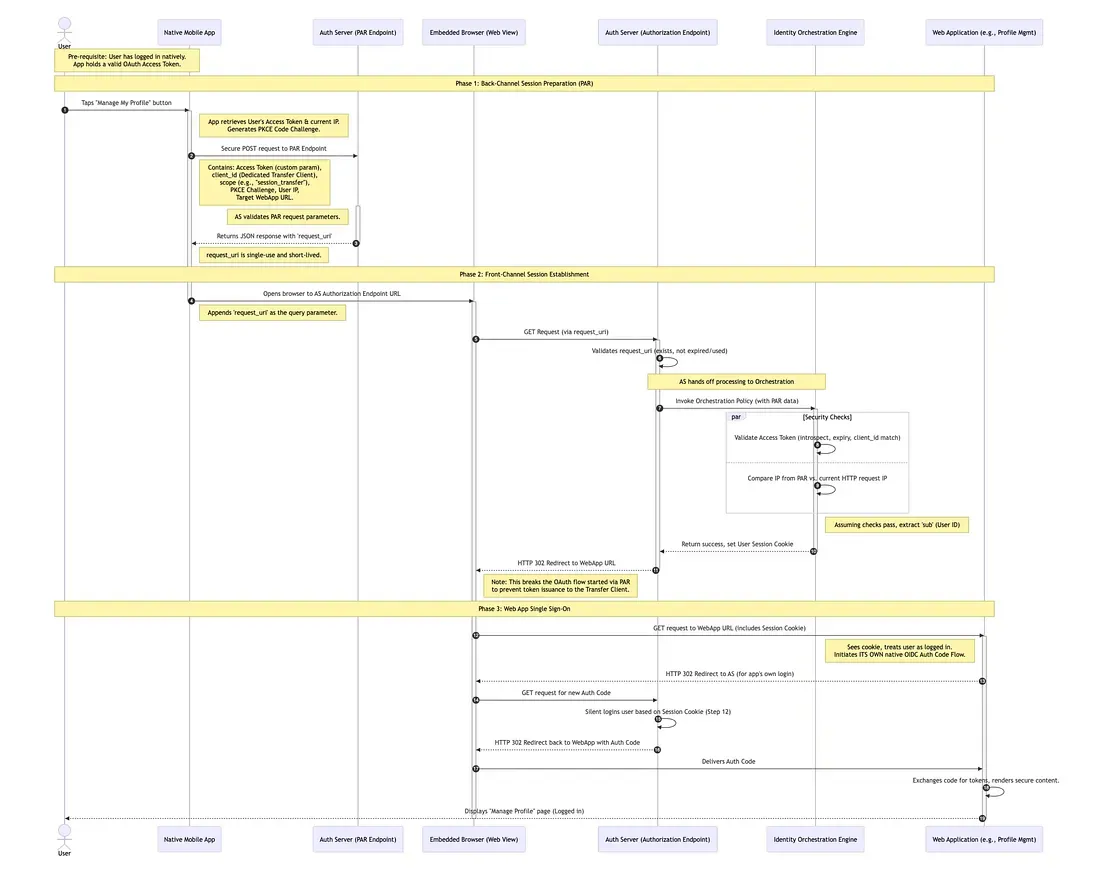
My good friend and proof-reader Gransomeuk pointed out that some folks will just want the take away, rather than the full three course meal. With his help, here’s the summary, with a nifty sequence diagram to match.
- Phase 1 (Back-Channel): The mobile app passes the highly sensitive access token directly to the Authorization Server over a secure connection (POST). In return, it gets a short-lived reference string (
request_uri). This solves the problem of putting the Access Token in a visible URL query string. - Phase 2 (Front-Channel): The app opens the browser using only the reference string. The Identity Orchestration engine (e.g., PingOne DaVinci) verifies that the person in the browser is the same person who holds the app token (by checking IP addresses, etc) and drops a session cookie in the browser.
- Phase 3 (SSO): The browser is redirected to the target Web Application. Because the cookie now exists, the Web App can sign the user in automatically via standard OpenID Connect without asking the user to type in a password again.
“Next time on…”
In the interests of keeping things digestible, I will publish two follow up articles in the coming weeks.
The first will explore the technical implementation of this pattern end-to-end, using PingOne SSO and PingOne DaVinci, together with a simple Android application to show it all working.
The second will dive a little deeper into some of the security implications of this approach, highlight the advantages, point out a number of inherent drawbacks and also suggest further steps that can be taken to harden the implementation.